
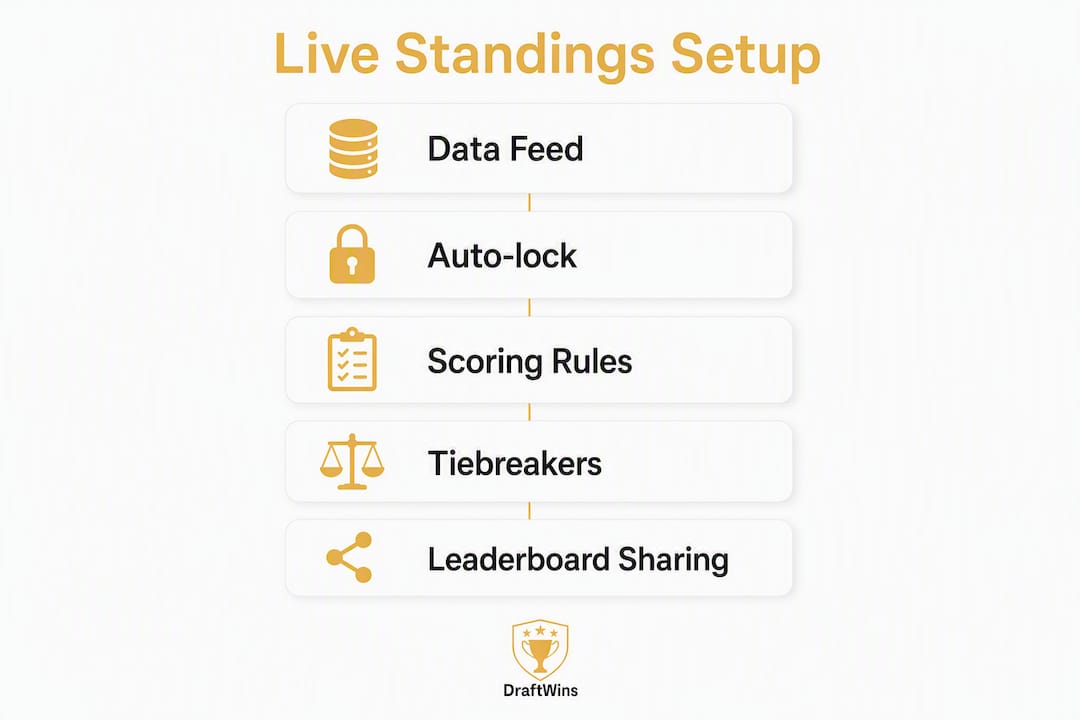
The fastest way to give participants trustworthy live standings: enable automated scoring, lock entries before kickoff, set tiebreakers in writing, and publish one single leaderboard link everyone can bookmark. Do those four things before your pool opens and you will field almost zero disputes. Platforms like Draftwins handle the first three automatically for team-draft pools covering the FIFA World Cup, NFL, and College Football.
Here is what to configure right now:
- Enable automated scoring so results flow directly into the leaderboard without manual entry.
- Set auto-lock at least 24 hours before the first match to cover time-zone confusion.
- Publish tiebreaker rules in writing before a single entry is submitted.
- Share one source-of-truth leaderboard link and post it in your group chat or email thread.
"The scoresheet is the backbone of any league night. Every match result, every game won and lost, flows from the scoresheet into your standings. Getting this right is non-negotiable." — Cued Up Operations Guide
Table of Contents
- How do live pool standings actually update in real time?
- What settings do you need for accurate live tracking?
- Why should you set tiebreakers before the pool starts?
- Commissioner setup checklist: from pool creation to first live leaderboard
- How do you share live standings without overwhelming participants?
- What should you do when standings are delayed or wrong?
- Draftwins makes team-draft pool management straightforward
- Key Takeaways
- Useful sources
- FAQ
How do live pool standings actually update in real time?
Live pool standings move through a short pipeline: raw match results arrive from a data feed, your scoring rules apply (points per win, round multipliers, bonus points), and the leaderboard recalculates. Understanding that pipeline tells you exactly which settings matter and why.
Data sources fall into two categories. Automated feeds pull official match results directly and timestamp every update, which removes human error from the equation. Manual entry, by contrast, depends on someone remembering to log scores promptly. For any pool with more than a handful of participants, automated scoring is the only realistic option.
Scoring pipeline basics:
- Raw result (win/draw/loss) enters the system.
- Scoring rules convert it to points: for example, 3 for a win, 1 for a draw, 0 for a loss.
- Round multipliers scale those points upward in later rounds. A common sequence is 1× (group stage) → 2× → 4× → 8× → 16× → 32× in the final, keeping late-round matches worth chasing.
- The leaderboard recalculates and publishes.
Update cadence matters more than most commissioners realize. Per-match updates feel exciting at first, but they create what experienced operators call "standings fatigue" — participants check obsessively early, then tune out by the knockout rounds. Round-close updates work better for casual pools: each update becomes a moment, something participants look forward to rather than scroll past.
| Update Cadence | Best For | Trade-Off |
|---|---|---|
| Per match | Hardcore pools, small groups | Fatigue risk, high noise |
| Round close | Casual and office pools | Builds anticipation, lower churn |
| Manual on request | Very small pools | Labor-intensive, dispute-prone |
"Update frequency is a major engagement lever: round-end updates create event moments and sustain casual players, while per-match updates can cause standings fatigue." — BracketsNinja 2026 Guide
Auto-locking and timestamping are the two technical behaviors worth understanding before you go live. Auto-lock closes entries at your deadline without you touching anything. Timestamping records exactly when each entry was submitted, which becomes your evidence if someone claims they submitted before the cutoff. Both are standard on modern platforms and both save you headaches.
What settings do you need for accurate live tracking?
Get these configured before you open entries. Changing them mid-pool is a dispute waiting to happen.
Scoring settings:
- Choose match points (win/draw/loss) or game points (individual games won), or a combination. Publish worked examples so participants can verify their own scores.
- Enable round multipliers if your pool runs through knockout rounds.
- Decide which columns appear on the leaderboard: wins, draws, point differential, total points.
Locking rules:
- Set the entry deadline at least a day before the first match to prevent timezone disputes.
- Enable auto-lock so the system enforces the deadline, not you.
- Confirm your platform handles timezone conversion correctly. A deadline listed as "11:59 PM" means nothing without a timezone.
Visibility settings:
- Decide who sees full entry details versus leaderboard-only views.
- Use a private link for closed friend groups; a public embed works for office pools on a shared intranet.
Recordkeeping: Draftwins charges commissioners a one-time hosting fee; participants join free. If you collect any separate entry fee from participants, keep time-stamped payment records in a shared document. Draftwins does not collect entry fees, hold prize pools, or accept wagers.
Pro Tip: Before entries open, screenshot your scoring settings and post them in your group channel. Participants who see the rules before they enter almost never dispute them after.

Why should you set tiebreakers before the pool starts?
Because once a tie actually happens, any ruling you make will look self-serving to the person who loses. Expert commissioners consistently report that pre-published tiebreakers cut end-of-season disputes dramatically.
Standard tiebreaker order for team-draft pools:
- Head-to-head record between the tied participants.
- Point differential (total points scored minus points allowed across all drafted teams).
- Most wins among drafted teams.
- Fewest goals allowed (for soccer pools like the World Cup).
- Predetermined playoff match result as a final tiebreaker.
One important edge case: when three participants are tied and A beat B, B beat C, and C beat A, head-to-head is circular and point differential among those three is the right next step. Document this scenario explicitly in your rules.
Stop the chain at five tiebreakers. An infinite chain signals that your rules have a gap; a coin flip or predetermined playoff result is a cleaner endpoint than a seventh criterion nobody can remember.
Publish a worked example. Show participants exactly how a hypothetical three-way tie would resolve under your rules. A concrete scenario eliminates more confusion than lengthy abstract policy.
Pro Tip: Add one sentence to your rules document: "Any correction or appeal must be submitted promptly after the standings update, with a specific match result cited." That single line helps prevent most disputes before they start.
Pre-published tiebreakers are the single most effective dispute-prevention tool available to a commissioner — more effective than any scoring system or platform feature.
Commissioner setup checklist: from pool creation to first live leaderboard
Follow this in order. Skipping steps is how pools end up with scoring errors on match day.
- Create the pool structure. Choose team-draft format, set the number of teams per participant, and decide roster rules (snake draft, random assignment, or manual pick).
- Select and configure your scoring model. Match points, game points, or a combination. Set round multipliers for knockout stages.
- Set the entry deadline and enable auto-lock. Confirm the timezone. For World Cup 2026, lock entries no later than 24 hours before the opening match.
- Enter tiebreaker rules in the platform's rules field. Copy them verbatim into your group announcement.
- Enable live leaderboard visibility. Decide public embed or private link.
- Invite participants and share the join link. Collect the hosting fee if applicable.
- Publish the single source-of-truth leaderboard link in your group channel and pin it.
- Run a dry run. Simulate a match result, confirm the leaderboard updates, and walk through the manual correction flow so you know how it works before you need it under pressure.
For deeper configuration walkthroughs, the team pool formats guide covers format choices and draft mechanics in detail.
How do you share live standings without overwhelming participants?
Sharing options:
- Private link: Best for friend groups and office pools. One URL, bookmarkable, no login required on most platforms.
- Public embed: Works for larger communities or pools hosted on a website.
- Round-close announcements: Post the updated leaderboard in Slack, Discord, or a group chat after each round closes. Embed the leaderboard image or link directly.
Notification cadence: Per-match pings work for a group of ten die-hards. For medium-size office pools, round-close digests keep engagement without burning people out. One message per round, with the top five standings and a link to the full leaderboard, is usually enough.
Privacy basics:
- Collect only what you need: a display name and contact method (email or phone).
- Store payment confirmations with timestamps in a shared document participants can request access to.
- Post a one-sentence privacy note in your rules: "Your contact info is used only to manage this pool and will not be shared."
Confirm your leaderboard renders correctly on mobile before the pool goes live. Most participants will check standings from their phones, not a desktop. A sports pool leaderboard that breaks on a small screen loses trust fast.
What should you do when standings are delayed or wrong?
Most live standings problems fall into three categories.
Delayed updates: Check whether the data feed is synced and whether auto-lock fired correctly. A missed lock can hold the leaderboard in a pre-match state. Verify timezone settings first; that is the most common culprit.
Incorrect scores: Pull the time-stamped result from the official source, apply the correction in the platform's admin panel, and announce the change publicly in your group channel with the before/after scores. Digital score-entry platforms create an audit trail automatically; manual spreadsheets do not.
Participant disputes: Follow the appeal process you published before the pool started. Ask for a specific match result and a timestamp. If the rules clearly cover the situation, apply them and close the appeal. If the rules are genuinely ambiguous, acknowledge it, make a fair ruling, and update the rules document for next time.
When a correction is necessary, announce it publicly before updating the leaderboard. Participants who see the change explained in advance almost never escalate it further.
For large pools with hundreds of participants, use a platform that supports batched leaderboard updates and embed caching. Refreshing a live embed on every page load for 300 simultaneous users will hit rate limits on most basic setups.
Draftwins makes team-draft pool management straightforward
Running a pool with automated scoring and a live leaderboard used to mean stitching together a spreadsheet, a group chat, and a prayer. Draftwins replaces that with a single platform built specifically for team-draft pools.
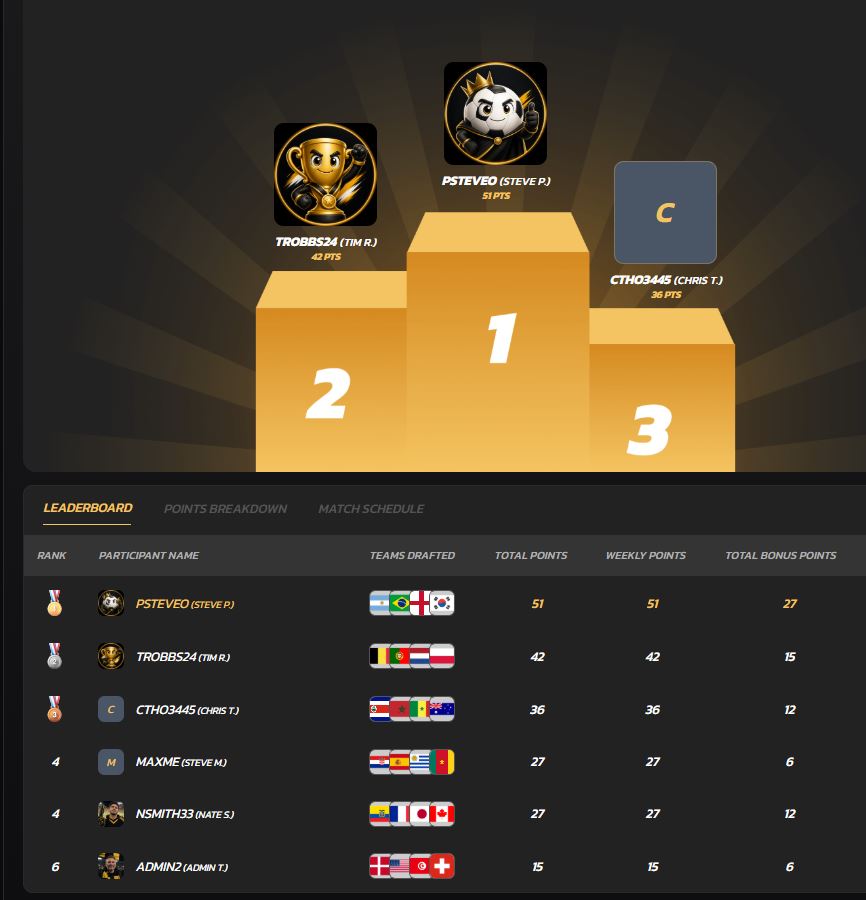
Commissioners pay a one-time hosting fee to create a private pool. Participants join free. Automated scoring pulls results directly into the leaderboard, round multipliers apply without manual math, and auto-locking enforces your deadline without you watching the clock. The leaderboard is mobile-friendly and shareable as a private link or public embed, so your group can check standings from anywhere.
Draftwins launches with World Cup pools and follows with NFL and College Football. If you want a pool where participants draft teams (not individual players) and standings update without manual work, create your pool at Draftwins and run the dry-run checklist before your first match kicks off.
Key Takeaways
A live pool leaderboard only stays trustworthy when automated scoring, pre-set tiebreakers, and a single published link are all in place before the first match.
| Point | Details |
|---|---|
| Auto-lock before kickoff | Set the entry deadline at least a day before the first match to prevent timezone disputes. |
| Round-close updates | Publish standings at round close, not per match, to sustain engagement without fatigue. |
| Tiebreakers in writing | Publish head-to-head, point differential, and a final playoff tiebreaker before entries open. |
| Dry run first | Simulate a match result and a manual correction before the pool goes live. |
| Draftwins for team-draft pools | Automated scoring, auto-locking, and mobile-friendly leaderboards in one platform with a one-time hosting fee. |
Useful sources
- How to Run a Pool League: Week-to-Week Operations Guide — Cued Up
- How to Run a FIFA World Cup Bracket Pool (2026 Guide) — BracketsNinja
- How to Set Up a Pool League From Scratch — Pro League Suite
- Checklist and Best Practices for Running a Betting Pool — BettorEdge
- Pool Play Tournament Guide: Format, Scheduling & Standings — Brakto
- Automated Scoring Systems for Sports Pools: 2026 Guide — Draftwins Blog
- How Football Pools Track Standings: 2026 Guide — Draftwins Blog
Save the BracketsNinja and Pro League Suite guides as printable references. The Draftwins blog posts cover platform-specific configuration steps for scoring rules, knockout-round multipliers, and leaderboard visibility settings.
FAQ
What is a live standings pool tracking guide?
A live standings pool tracking guide explains how to configure automated scoring, set tiebreakers, and publish a real-time leaderboard so participants can follow results without waiting for manual updates.
How often should standings update in a casual pool?
Round-close updates work best for casual pools. Per-match updates create engagement early but cause fatigue before the knockout rounds.
What tiebreakers should a commissioner set before the pool starts?
Start with head-to-head, then point differential, then most wins. For three-way ties where head-to-head is circular, go straight to point differential among the tied participants.
Does Draftwins charge participants to join a pool?
No. Commissioners pay a one-time hosting fee to create the pool; participants join and compete for free. Draftwins does not collect entry fees, hold prize pools, or accept wagers.
What should a commissioner do when standings show an incorrect score?
Pull the time-stamped result from the official source, apply the correction in the admin panel, and announce the change publicly in the group channel with the before/after scores before updating the leaderboard.