
The fastest way to run a private, team-draft sports pool with zero spreadsheet headaches is to use a web-based platform that automates drafts, scoring, and live leaderboards from day one. Draftwins is built exactly for this: commissioners pay a one-time hosting fee, set up a private pool in minutes, and participants join free.
Three things make this approach work:
- Private pool creation with shareable invite links so you control who's in and who's out
- Automated draft tools that handle serpentine or offline drafts without a moderator babysitting every pick
- Automatic scoring and live leaderboards that update as results come in, so nobody's texting you asking "who's winning?"
Key Takeaways
Team-draft private pools with automated scoring and live leaderboards are the lowest-friction way to run a group sports contest — and the right platform does most of the commissioner work for you.
| Point | Details |
|---|---|
| Use a web-based platform | Automated drafts, scoring, and leaderboards eliminate manual spreadsheet work for commissioners. |
| Scoring template choice matters | Weighted or escalating-round formats preserve comeback potential and keep all participants engaged longer. |
| Smart players hold a real edge | A well-informed participant can achieve a 5–10× higher chance of finishing in the money versus the average player in casual pools. |
| Publish rules before the draft | Locking scoring rules and tiebreakers before draft day prevents the majority of disputes. |
| Draftwins for commissioners | One-time hosting fee, participants join free, with private pools, automated scoring, and live leaderboards built in. |
Table of Contents
- What is digital score tracking in group pools, and why do commissioners use it?
- What features should you require from a pool score management platform?
- How do you set up a web-based team-draft pool step by step?
- How does automated scoring actually work? Example templates and calculations
- Pricing, fees, and legal considerations for U.S. commissioners
- Best practices to keep your pool fair and fun all season
- Quick troubleshooting for the most common commissioner problems
- Why Draftwins works for team-draft pool commissioners
- Sources
- FAQ
What is digital score tracking in group pools, and why do commissioners use it?
A team-draft private pool is an organizer-led contest where each participant drafts teams, not individual players. The platform scores those picks automatically as real-world results come in and displays a live leaderboard the whole group can follow.
Common setups include:
- Office World Cup pools where coworkers each draft national teams and track group-stage results
- Season-long NFL or College Football contests where friends draft franchises and accumulate points each week
- Tournament survivor pools where participants draft teams to advance through bracket rounds
This is a different animal from player-based fantasy leagues. Team-draft pools remove lineup management entirely — no waiver wires, no injury monitoring, no weekly roster decisions. You draft your teams before the tournament or season starts, then watch. That simplicity is exactly why casual groups prefer it over traditional fantasy.
What features should you require from a pool score management platform?
Not every platform is worth your time. Here's what actually matters for a commissioner running a digital group scorekeeping setup:
Automated draft engine. Serpentine drafts, randomized slot assignments, and offline draft options for groups that can't all be online simultaneously. Draft timers prevent one person from stalling the whole room.
Configurable scoring templates. Win/draw/loss point values, bonus points for upsets, and tiebreaker rules should all be editable before the pool locks. Bracket-style tournament pools can produce 13.7 quintillion possible outcome combinations for a single World Cup format — manual scoring at that scale is simply not viable.
Live leaderboards with pick overlays. Participants want to see not just their rank but why they're ranked there. Per-round leaderboards and pick-by-pick correctness views keep engagement high between matchdays.
Private pool controls. Role-based access (commissioner vs. participant), invite-only links, and optional public sharing. You own the pool; the platform just runs it.
Payment and prize guidance. Draftwins charges commissioners a one-time hosting fee; participants join free. The platform does not collect entry fees, hold prize money, or pay out winnings — prize handling stays between you and your group.
Pro Tip: Look for platforms with auto-reconciliation and notification automation. One case study found that a commissioner dashboard with automated payment reconciliation and bracket syncing eliminated multiple hours of manual work per tournament (https://mahluminnovations.com/case-studies/march-madness-commissioner). That's the difference between running a pool and running yourself ragged.
How do you set up a web-based team-draft pool step by step?
Follow this checklist from pool creation through final standings.
Before the draft:
- Choose your sport and contest format (World Cup group stage, NFL season, College Football bowl season)
- Set scoring rules, tiebreaker logic, and prize structure in writing before anyone drafts
- Decide draft format: live serpentine, randomized offline, or commissioner-assigned picks
- Create your private pool on the platform and generate your invite link
- Set an RSVP cutoff date — at least 48 hours before draft day
Draft day:
- Send the invite link and confirm all participants have web access (no app download required on Draftwins)
- Open the draft room at the scheduled time; the platform timer handles pace
- For absent participants, use the platform's auto-pick or pre-ranked fallback so no slot goes empty
- Lock the draft once complete; the platform freezes picks and begins scoring automatically
During the contest:
- Monitor the leaderboard after each matchday or game week
- Address scoring disputes within a defined window (24–48 hours is standard) using the platform's pick logs
- Send weekly leaderboard updates to keep participants engaged
After the contest:
- Finalize standings once all results are confirmed
- Export results for your records
- Distribute prizes directly to winners using your group's agreed payment method (Venmo, Zelle, cash)
- Announce the winner publicly in your group chat
Common fixes:
- Missing picks after draft lock: Use the auto-pick log to verify the platform assigned a fallback; document it before announcing
- Scoring mismatch: Cross-reference the platform's scoring normalization guide against the official result source
- No-show on draft day: Pre-set a ranked preference list during RSVP so the system drafts on their behalf
How does automated scoring actually work? Example templates and calculations
Three scoring templates cover most casual group pools:
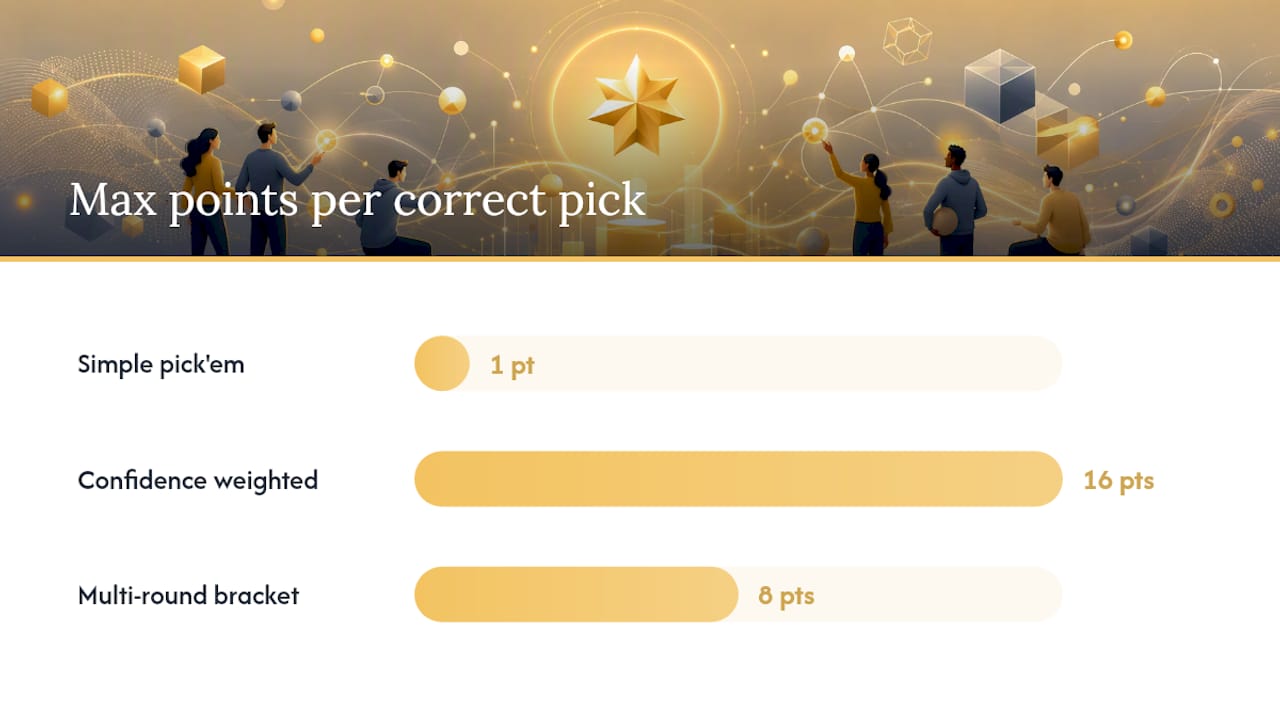
Template 1: Simple pick'em points. Each correct team pick earns 1 point per win. A participant who drafted four teams that each win their group earns 4 points that round. Clean, easy to explain to anyone.
Template 2: Confidence/weighted points. Participants assign a multiplier (1–16 for a 16-team pool) to each pick. A correct pick on your highest-confidence team earns 16 points; a correct pick on your lowest earns 1. This rewards conviction and creates separation on the leaderboard faster.
Template 3: Multi-round bracket scoring. Points escalate by round: 1 point for a correct Round of 16 pick, 2 for quarterfinals, 4 for semis, 8 for the final. A participant who nails the champion earns 8 points from that single pick alone.
| Template | Correct pick value | Tiebreaker method | Best for |
|---|---|---|---|
| Simple pick'em | 1 pt per win | Total wins, then head-to-head | Casual, first-time groups |
| Confidence weighted | 1–16 pts by rank | Highest single-pick score | Competitive office pools |
| Multi-round bracket | Doubles each round | Final score prediction | Tournament formats |
The EPL Fun Pool's published rules demonstrate how explicit tiebreaker structures reduce disputes — a lesson that applies directly to any group pool format.
Pro Tip: Pick a scoring format that preserves comeback potential. If one person can run away with the lead by Week 3, half your group checks out. Weighted or escalating-round formats keep the leaderboard competitive deep into the contest.
PoolGenius research shows that a well-informed player can realistically achieve a 5–10× higher chance of finishing in the money versus the average participant in casual football pool formats. Scoring templates that reward strategy over pure luck are what create that gap.
Pricing, fees, and legal considerations for U.S. commissioners
Draftwins uses a one-time hosting fee paid by the commissioner. Participants join and compete for free. The platform does not collect entry fees, hold prize pools, or pay out winnings — that's entirely your group's arrangement.
For prize handling, keep it simple and documented:
- Collect entry fees upfront via Venmo, Zelle, or PayPal before the draft locks
- Keep a simple ledger (even a shared Google Sheet) showing who paid and how much
- Distribute prizes promptly after final standings are confirmed, using the same payment method you collected with
- Avoid cash-only setups for larger groups — digital transfers leave a record if anyone disputes the payout
On the legal side: non-gambling office pools run for social prizes are widely accepted in U.S. workplaces, but check your employer's specific policy before running one at work. Keep the contest transparent, friendly, and clearly non-commercial.
Best practices to keep your pool fair and fun all season
A few habits separate pools people talk about for years from ones that fall apart by Week 2.
Publish rules before the draft, then lock them. Post your scoring rules, tiebreaker logic, and prize structure in the invite message. Once the draft locks, no rule changes. This single habit eliminates most disputes.
Use draft timers and auto-pick fallbacks. A draft that stalls because one person went AFK kills momentum. Set a 90-second timer and configure an auto-pick fallback based on each participant's pre-ranked preferences.
Keep a public draft log. Participants should be able to see every pick in order after the draft closes. Transparency prevents "I didn't pick that team" arguments.
Run a serpentine draft for fairness. The last pick in Round 1 gets the first pick in Round 2. Randomize slot assignments so no one can claim the commissioner rigged the order.
Send reminders and mid-season leaderboard updates. Groups that get weekly standings updates stay engaged. Groups that don't hear anything for three weeks go quiet.

Pro Tip: Write a one-page "rules at a glance" and paste it directly into your invite link message. New or casual participants won't read a long document, but they will read a clean, simple pick guide pinned right where they sign up.
Quick troubleshooting for the most common commissioner problems
A participant says their picks weren't saved. Check the platform's draft log first. If the log shows their picks, the issue is on their end. If the log shows auto-pick was used, confirm the fallback list was set before draft lock and document it.
The leaderboard doesn't match what I calculated manually. Scoring normalization can differ when results come from multiple sources. Review the platform's automated scoring guide to confirm which result source the platform uses as authoritative, then reconcile from there.
Two participants are tied and both want first place. Apply your pre-published tiebreaker rule. If you didn't publish one, split the prize equally — and add a tiebreaker rule before next season.
A participant dropped out mid-contest. Don't delete their entry. A ghost team still affects leaderboard math. Mark them inactive in your records and note it publicly so other participants understand the standing.
When to pause a pool: Only pause if a real-world event (postponed tournament, canceled matches) makes scoring impossible to calculate fairly. Communicate the pause immediately, state the reason, and give a timeline for resumption.
Why Draftwins works for team-draft pool commissioners
Running a private sports pool should feel like hosting a game night, not managing a spreadsheet project. Draftwins covers the full commissioner workflow: private pool creation, automated team drafts, live leaderboards, configurable scoring rules, and a one-time hosting fee so participants always join free.
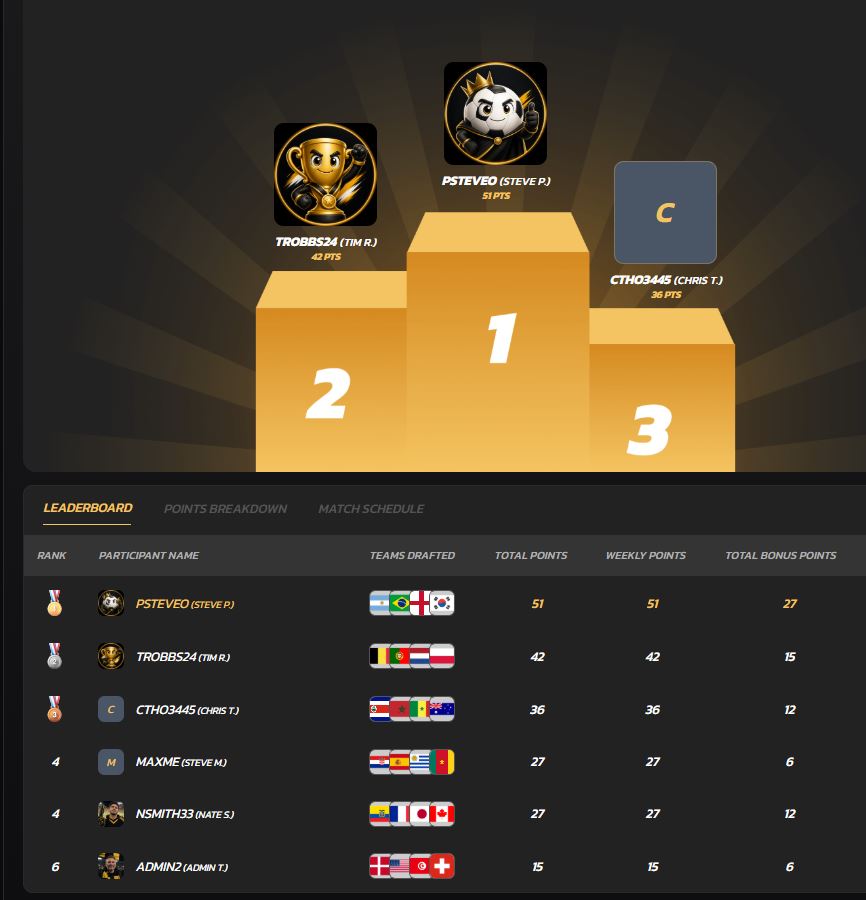
The platform launches with World Cup pools, with NFL and College Football pools following. Setup takes minutes, the draft runs itself, and the leaderboard updates automatically as results come in. Support and onboarding docs are available directly on the platform.
Create your private pool on Draftwins and have it ready to share before your group's next big tournament.
Sources
FAQ
What is a team-draft group pool?
A team-draft group pool is a private contest where participants draft sports teams (not individual players) before a tournament or season, and a platform automatically scores picks and updates a live leaderboard as real results come in.
How does automated scoring work in digital group pools?
The platform pulls official match results, applies your pre-configured scoring template (points per win, weighted picks, or escalating bracket rounds), and updates every participant's score and rank without any manual input from the commissioner.
Who pays for a Draftwins pool?
The commissioner pays a one-time hosting fee to create and run the pool. Participants join and compete for free. Draftwins does not collect entry fees, hold prize money, or pay out winnings.
How do I handle tiebreakers in a group pool?
Set your tiebreaker rule in writing before the draft locks — common options include total wins, highest single-pick score, or a final-score prediction. If two participants tie and no rule was published, splitting the prize equally is the fairest resolution.
Can I run a sports pool at work?
Non-gambling office pools run for social prizes are widely accepted in U.S. workplaces, but check your employer's specific policy first and keep the contest transparent and clearly non-commercial.