
The best way to run a private contest is to host a password protected sports pool on a dedicated platform and lock down access through the commissioner's own controls, not a shared spreadsheet or an open group chat link. A password-protected sports pool is an invite-only contest secured by a commissioner-issued access code, so only the people you actually invited can join, view standings, or see who picked what.
That single setup decision solves most of the headaches organizers run into later. Here's why it works:
- Invite-only access keeps the pool off public radar entirely, which matters more than most first-time commissioners realize. Private group channels and password protection prevent accidental public exposure from an open Slack channel or a public social post, so outsiders never stumble into your office pool.
- Automated scoring and live leaderboards remove the spreadsheet math that turns commissioners into unpaid data-entry clerks every Sunday night.
- Clear payout handling up front, whether the platform touches the money or not, heads off the arguments that actually sink friend-group pools.
DraftWins builds its pools around exactly this model: password-restricted access, automated scoring, and commissioner tools that don't require anyone to touch a spreadsheet. Combine that with basic HR guidance on workplace pools and you've got a setup that's both fun and defensible if anyone asks questions later.
Key Takeaways
The most reliable way to run a private contest is a password-protected pool with clear rules, transparent payout math, and a platform that separates hosting from payment handling.
| Point | Details |
|---|---|
| Lock down access first | Enable password protection and share the code through a private channel, not a group thread. |
| Publish rules before entries open | Post scoring, tiebreakers, and payout math up front to prevent the most common disputes. |
| Decide payment handling early | Choose whether the commissioner or a separate escrow service holds entry fees, since the platform won't. |
| Check workplace policy first | Confirm HR rules and avoid manager-run pools before charging any entry fee. |
| Run a test before inviting everyone | Verify the password, deadline, and payout math display correctly before sending invites. |
| Consider DraftWins for hosting | DraftWins offers password-protected pools with automated scoring and commissioner tools for a one-time hosting fee, without touching entry fees or payouts. |
Table of Contents
- How Do You Set Up a Password Protected Sports Pool?
- Which Pool Formats Work Best for Private Groups?
- What Security Features Should a Private Pool Have?
- Who Should Hold the Money: Platform or Commissioner?
- What Legal and Workplace Rules Apply to Paid Pools?
- What Should a Commissioner Publish Before Launch?
- Why Commissioners Choose DraftWins for Private Pools
- Where Can Organizers Find More Guidance on Pool Policy and Setup?
- Get Your Private Pool Running With DraftWins
- Sources
- FAQ
How Do You Set Up a Password Protected Sports Pool?
Getting a private pool live takes less time than most commissioners expect. Follow this order and you'll avoid the two most common mistakes: forgetting to set a real deadline and inviting people before the rules exist.
- Create the pool on your chosen platform and name it something participants will recognize in their inbox.
- Choose your format (pick'em, survivor, squares, bracket, or team-draft) based on group size and how much weekly upkeep you want.
- Enable password protection in the privacy settings, generating a unique join code or link tied to that specific pool.
- Build your invite list and decide whether you're sending the password directly or sharing a private join link instead.
- Set your entry deadline with enough buffer before the first game or event to catch stragglers.
- Post simple rules covering scoring, tiebreakers, and payout math before a single pick gets made.
On the setup screens themselves, you'll typically configure four things: the privacy toggle (public versus password-protected), password requirements, a tiebreaker field, and your payout structure. Don't skip the tiebreaker field. It feels like an afterthought during setup and becomes the only thing anyone argues about in week one.
Pro Tip: Send the password through a private channel, like a direct message or a personal email, rather than pasting it into a group thread. Group chats get forwarded, screenshotted, and shared more often than people expect, and a leaked password defeats the entire point of a private pool.
Before you open the doors, run through a short launch-day checklist:
- Confirm the password actually works by testing it yourself, from a separate account if possible.
- Verify the entry deadline displays correctly and matches the real first game or event.
- Double-check payout math adds up to 100% of the collected pot before anyone sees it.
Which Pool Formats Work Best for Private Groups?
Not every format handles privacy the same way, and picking the wrong one can create extra work for a commissioner who just wanted something low-maintenance. A handful of formats dominate the private-pool space for good reason:
- Pick'em pools, where participants pick winners each week, work well behind a password because standings only matter to the people inside the group.
- Survivor pools thrive in private settings since eliminated players often want to quietly disappear from view rather than have their bust broadcast.
- Squares are naturally suited to small, closed groups. Nobody outside your office or friend group needs to see who owns which number.
- Bracket and tournament pools need careful privacy settings if the platform defaults to public bracket visibility. Check that before you invite anyone.
- Team-draft alternatives, where participants draft entire teams instead of individual players, add an extra privacy wrinkle worth flagging: draft order and pick history should stay visible only to pool members.
For a small office pool or a group of a dozen friends, team-draft formats tend to work better than player-based fantasy leagues because there's no weekly lineup management, no injury news to track, and no waiver wire drama to referee. If your group wants something with almost zero weekly upkeep, squares-style pools are worth a look too. Bracket pools, by contrast, suit groups that want one big event (March Madness, a World Cup knockout stage) rather than a season-long commitment, and tournament pool structures matter more there because payout tiers usually scale with how far a team advances.
What Security Features Should a Private Pool Have?
A password field alone doesn't make a pool secure. Before you launch, confirm the platform you're using covers these basics:
- Password-protected join, so entry genuinely requires the code, not just a guessable URL.
- Unique join links per pool, not a shared link that could work for multiple contests.
- Role-based admin controls that separate commissioner permissions from regular participant access.
- Encrypted password storage or token-based authentication on the back end.
- HTTPS across every page, not just the login screen.
- Optional two-step verification for the commissioner account specifically, since that's the login with the most access.
- Email verification for participants joining the pool.
- A clear way to delete an account or leave a pool if someone changes their mind.
Some newer pool projects lean on modern authentication standards to hit these marks. One open-source pool project, for example, uses JWT-based authentication and encrypted password storage as its baseline security layer, which is a reasonable benchmark to compare any commercial platform against. On the more experimental end, some encrypted betting-pool implementations even keep event data encrypted and share access keys only through the pool author, which shows how far the privacy model can go for groups that want it.
Password rules matter too. Require at least eight characters, mix cases if the platform supports it, and steer clear of dictionary words tied to team names or nicknames, since those get guessed fast in a small group. Only rotate the password if you actually suspect it leaked. Changing it every week just annoys people and generates support requests.
Pro Tip: Collect as little personal data as possible during signup. If you're gathering entry fees outside the platform, never store card numbers or bank details inside the pool tool itself. Keep payment information in a dedicated payment app and keep the pool platform focused on picks and standings.
Who Should Hold the Money: Platform or Commissioner?
Entry fees and payouts are where private pools get complicated, and the answer depends entirely on who's holding the funds.
| Approach | Custody of funds | Fee structure | Dispute handling |
|---|---|---|---|
| Platform-collected | Platform holds and disburses funds | Often a percentage cut of the pot | Platform terms of service govern disputes |
| Commissioner-collected | Commissioner personally holds funds | No platform fee on the pot itself | Commissioner resolves disputes directly |
| Platform hosting fee only | Nobody on the platform holds funds; commissioner handles money separately | One-time flat fee to run the pool | Commissioner documents and resolves payouts |
DraftWins operates on that third model: a one-time platform hosting fee paid by the commissioner, with no entry fees collected, no prize pool held, and no payouts processed through the platform itself. That's a meaningfully different setup than a platform acting as an escrow agent, and it's worth understanding before you launch.
A simple payout example makes the math clear. For instance, if there is a pot collected from multiple participants, a common split might pay the majority to first place, less to second, and a small portion to third. Publish that math before entries open, not after the season ends.
When a platform doesn't touch the money, document payouts in writing (a shared note or spreadsheet works fine), and for larger pots, consider a dedicated escrow service rather than trusting an informal Venmo chain. For workplace pools specifically, nonmonetary prizes (a gift card, a trophy, bragging rights) sidestep most of this complexity entirely.
What Legal and Workplace Rules Apply to Paid Pools?
Before you charge a single entry fee, check three things: your employer's written policy, your state's gambling statutes, and the payment platform's own terms of service. Skipping this step is how a fun office pool turns into an HR conversation nobody wanted.
- Confirm whether your employer has a written policy on pools and fantasy leagues. ADP's workplace guidance notes that companies can restrict gambling at work, and a written policy reduces both compliance risk and the productivity drag pools can create.
- Don't let a manager run the pool. Sample employer guidance recommends monitoring gambling activity and applying policies consistently, and keeping supervisors out of the commissioner role avoids any appearance of coercion.
- Keep prizes nominal or nonmonetary where possible. SHRM's guidance on office betting pools recommends voluntary participation and modest prizes specifically to protect workplace culture.
A written policy doesn't need to be a legal document. It needs to say who can run a pool, what kind of prizes are allowed, and how often pools happen, so nobody has to guess and nobody feels pressured to join.
This isn't legal advice, and gambling statutes vary by state and by whether real money changes hands. If you're running a pool with meaningful entry fees, especially in a workplace, it's worth a quick conversation with legal counsel or your HR department before you collect a dollar.
What Should a Commissioner Publish Before Launch?
Most pool disputes have nothing to do with picks and everything to do with unclear rules. Publish these six items before anyone submits an entry:
- Entry deadline, stated as an exact date and time, not "before kickoff."
- Tiebreaker method, spelled out in one sentence so there's no debate later.
- Scoring rules, including how partial points or bonus categories work if your format uses them.
- Payout math, showing the exact dollar split by place.
- Dispute resolution process, even if it's just "commissioner has final say."
- Contact info for questions, so people aren't guessing who to message.
A short paragraph works better than a long document. Something like: *"Entries close Thursday at 8pm ET. Ties are broken by total points scored in the championship game.
Private pools that publish payout math and tiebreakers up front see far fewer disputes than pools that leave those details vague, because ambiguity, not competitiveness, is what actually causes conflict.
Set reminders two or three days before your deadline. Late entries are the single most common source of friction in private pools, and a simple nudge in the group chat solves most of it before it becomes an argument.
Why Commissioners Choose DraftWins for Private Pools
DraftWins was built specifically around the private, password-protected model rather than treating it as an add-on feature. The core toolset includes:
- Password-restricted pool access so only invited participants can join.
- Automated scoring that updates without any manual data entry.
- Live leaderboards so standings update in real time during games.
- Customizable rules and scoring formats set by the commissioner.
- Team-draft formats where participants draft whole teams instead of individual players, removing lineup management and injury tracking entirely.
- Commissioner tools for managing invites, deadlines, and pool settings from one dashboard.
The business model is straightforward: commissioners pay a one-time platform hosting fee to create and run a pool. DraftWins does not collect entry fees, hold a prize pool, accept wagers, or process payouts. That means commissioners still need their own plan for entry fees and prizes, whether that's cash collected in person, a documented Venmo split, or nonmonetary prizes for workplace groups. For larger pots, an escrow service is worth considering since it removes the commissioner from personally holding other people's money.
Where Can Organizers Find More Guidance on Pool Policy and Setup?
A few resources are worth bookmarking if you're setting up your first private pool or updating a workplace policy:
- ADP's workplace guidance on managing office pools and fantasy leagues covers the compliance basics every HR department should know.
- SHRM's employer guidance on March Madness office betting pools breaks down nominal-prize recommendations in more depth.
- Sample employer policy language from MRA's office pools guidance gives commissioners and HR teams a starting template.
Workplace participation in pools like March Madness brackets tends to spike every year around major tournaments, which is exactly why SHRM recommends having a policy ready before the next big event rather than scrambling once a pool is already underway.
Once your rules and policy are settled, DraftWins' pool platform is the natural next stop for actually building and password-protecting your contest.
Get Your Private Pool Running With DraftWins
DraftWins takes the format organizers already understand, drafting whole teams instead of juggling individual player rosters, and wraps it in the privacy controls this guide just walked through.
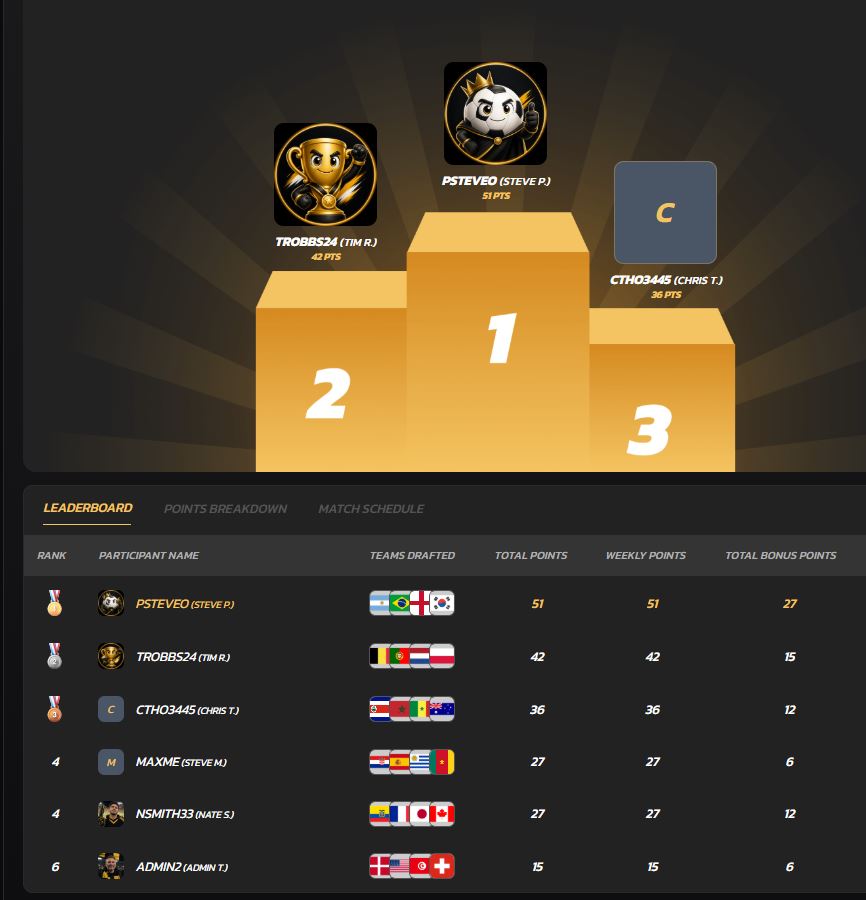
You get password-protected access, automated scoring, and live leaderboards without touching a spreadsheet or managing weekly lineups. The team-draft format means nobody drops out because their star player got hurt in week three, and commissioners get rules and scoring options they can actually customize instead of fighting a rigid template. DraftWins charges a single one-time hosting fee to launch a pool. It doesn't collect entry fees or hold prize money, so you keep full control over how your group handles its own pot, whether that's cash in an envelope or a documented split among friends. DraftWins is launching with World Cup pools, with NFL and College Football pools to follow. If you're ready to set up a private, password-protected pool for your office or friend group, create your pool on DraftWins and have it locked down and ready for invites in a few minutes.
This article is general information, not a substitute for advice from a qualified lawyer. Consult a qualified legal professional about your own circumstances before acting on anything here.
Sources
- Managing Office Pools and Fantasy Sports Leagues in the Workplace | ADP
- Office Pools, Games and Lotteries (sample employer guidance) | MRA – The Management Association, Inc.
- How employers can approach March Madness office betting pools | SHRM
- How to Run an Office Betting Pool Legally: Stay Compliant, Keep It Fun 2026 | SuccessKnocks
FAQ
What Is a Password Protected Sports Pool?
It's an invite-only contest where entry requires a commissioner-issued access code, keeping standings, picks, and participant lists visible only to people who were actually invited.
How Do I Make My Sports Pool Private?
Enable the password or invite-only setting during pool creation, then share the access code or join link directly with participants rather than posting it publicly.
Does DraftWins Handle Entry Fees and Payouts?
No. DraftWins charges a one-time platform hosting fee to the commissioner but does not collect entry fees, hold a prize pool, or process payouts, so commissioners handle money separately.
Can My Employer Restrict Office Sports Pools?
Yes. Employers can restrict gambling activity at work, and ADP's guidance recommends a written policy covering pools and fantasy leagues to manage compliance risk.
What Pool Format Works Best for a Small Private Group?
Team-draft formats and squares both work well for small, private groups since they require minimal weekly upkeep and no lineup management, unlike traditional player-based fantasy leagues.