
Yes, you can run a private college football draft pool with almost no admin work, and the fix is simpler than most commissioners expect: use a web-based team-draft platform instead of a spreadsheet. A team-draft pool lets your group draft entire college football programs instead of individual players, and a platform like DraftWins handles the scoring, invites, and leaderboard automatically once you set the rules. Your first move is to create a private pool and lock in one simple rule set before you send a single invite.
The reason this works: automated scoring and live leaderboards remove the two jobs that burn out most commissioners, tallying results by hand and settling disputes about what counts as a win.
Key Takeaways
A low-effort college football draft pool comes down to three things: a simple locked rule set, a randomized draft order, and a platform that automates scoring so nobody has to tally results by hand.
| Point | Details |
|---|---|
| Pick a template before inviting anyone | Use the Casual, Classic, or Competitive scoring rules above and lock them in before the draft. |
| Randomize the draft order | A random draft order protects fairness since the first pick can be a real advantage some seasons. |
| Draft one to two weeks before kickoff | This window builds anticipation without letting the pool go stale before the season starts. |
| Handle prizes off-platform | DraftWins does not collect entry fees or pay out winnings, so agree on payout logistics with your group directly. |
| Check local rules on buy-ins | If your pool includes a cash buy-in, confirm it complies with your state and workplace policies before collecting money. |
| Use DraftWins to remove the admin work | DraftWins hosts private team-draft pools with automated scoring, live leaderboards, and a one-time commissioner fee. |
Table of Contents
- Why a College Football Draft Pool Beats a Player-Based Fantasy League
- How Do You Set Up a College Football Draft Pool?
- What Scoring Rules Should a College Football Draft Pool Use?
- When Should You Hold the Draft, and How Often Should You Check Scores?
- How Do You Keep a College Football Draft Pool Fun All Season?
- Which Platform Features Actually Matter for Commissioners?
- What Should Be on Your Setup Checklist Before You Send Invites?
- Ready to Run Your Own Pool This Season?
- Sources
- FAQ
Why a College Football Draft Pool Beats a Player-Based Fantasy League
A team-draft pool asks your group to draft whole programs, Georgia, Ohio State, Texas, whatever's on the board, and then score based on how those teams perform week to week. A player-based fantasy league asks the same group to draft quarterbacks and receivers, track snap counts, and manage a bench. For a private group of friends, co-workers, or family who want something fun without a second job, the team-draft format wins on almost every axis that matters to a commissioner.
Here's what commissioners consistently value about the team-draft format:
- Lower time commitment. No weekly lineup decisions, no waiver wire, no "who do I start" texts at 11 PM.
- No injury management. A team's whole roster carries the workload, so one player getting hurt doesn't tank someone's whole pool.
- Bigger, more social participation. Casual fans who'd never touch a fantasy app will draft a team they already have a rooting interest in.
- Simpler scoring. Wins and losses are easy to track and explain to a group chat.
- Commissioner control. You set the rules once, and the platform enforces them for the rest of the season.
- Built-in drama. Someone always ends up rooting hard for a team they didn't even want on draft day.
There's a workplace angle here too. Research on recreational team competitions shows they break down hierarchy and build trust across departments, often on a shoestring budget. A college football draft pool at the office does the same thing for a fraction of the effort a full fantasy league demands.
How Do You Set Up a College Football Draft Pool?
Getting a pool live is a six-step process, and none of the steps take longer than a coffee break.
- Build your invite list first. Decide the group size that fits your private pool before you touch anything else, since your draft format depends on headcount.
- Choose your draft format. Snake draft is the standard for private groups; auction-style works if your crew likes bidding and wants every team to feel attainable.
- Set your scoring rules. Decide upfront whether a win counts as a flat point, or if you'll add bonus points for conference championships or playoff wins.
- Schedule the draft. Pick a date and time that works for the group, ideally a week or two before the season kicks off, and stick to it.
- Publish invites with the rules attached. Send a short message with the draft time, scoring summary, and a link to join, so nobody shows up confused.
- Run the draft and lock the results. Once every team is drafted, lock the pool so rules and picks can't be changed midstream.
A quick copy-paste for your invite message: "You're invited to our college football draft pool. Draft is [date] at [time]. We're drafting whole teams, not players, so no lineup management all season. Scoring: 1 point per win, 2 bonus points for conference titles. Join here: [link]."
Pro tip: Always randomize the draft order instead of letting people pick their own slot. The first pick can be a real advantage some seasons, and randomizing keeps it fair from the jump.

What Scoring Rules Should a College Football Draft Pool Use?
Pick a rule set based on how competitive your group actually is, not how competitive you wish they were. Here are three templates you can copy directly into your invite or platform rules field.
Casual template: Snake draft, randomized order. Each team win equals 1 point. No bonus points. Winner takes bragging rights or a low-stakes prize like a gift card. Best for friend groups and family pools where the goal is a shared group chat all fall.
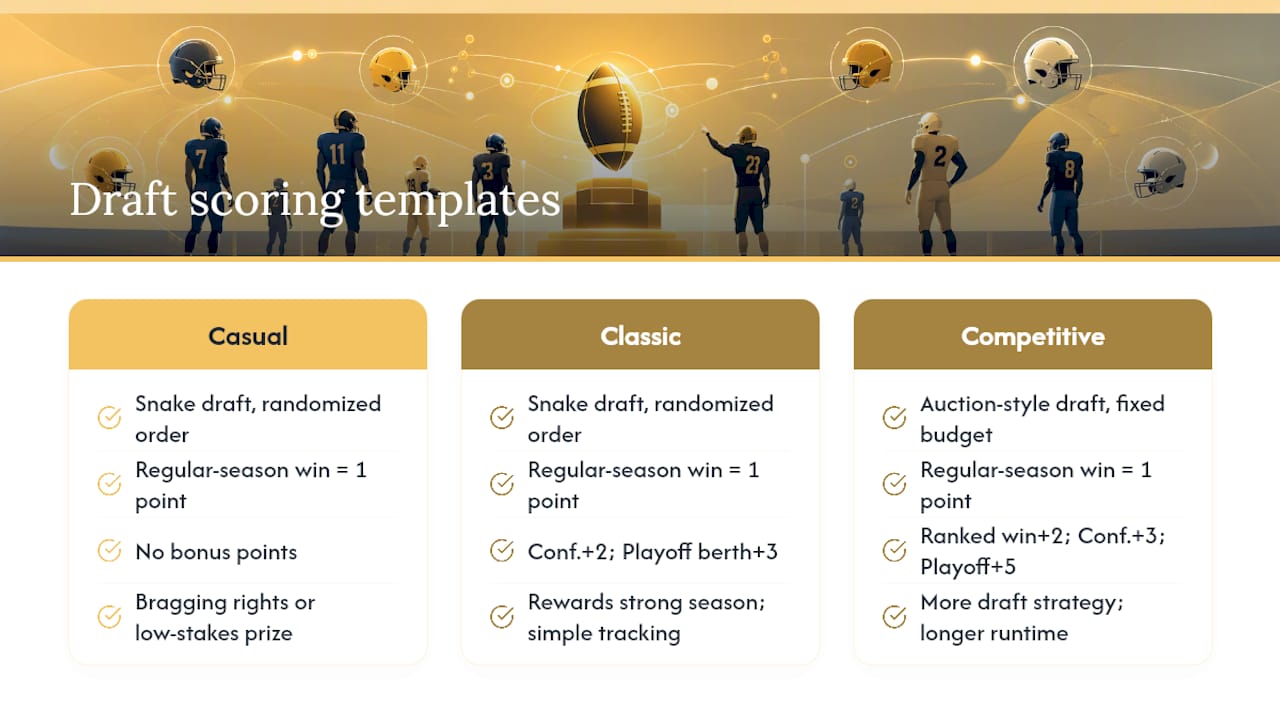
Classic template: Snake draft, randomized order. Each regular-season win equals 1 point, conference championship win equals 2 bonus points, and a playoff berth adds 3 points. This is the format most private pools land on because it rewards a strong season without requiring anyone to track individual stats.
Competitive template: Auction-style draft with a fixed budget per drafter. Regular-season win equals 1 point, ranked-opponent win equals 2 points, conference title equals 3 points, playoff win equals 5 points. Best for office pools where people want more strategy in the draft itself.
Snake drafts are faster to run and easier to explain to newcomers. Auction-style drafts take longer but let every participant bid on the teams they actually want, which some groups find more entertaining. Sealed picks, where everyone submits a ranked list privately, work well for large groups that can't get everyone on a call at the same time.
Keep the template as simple as your group will tolerate. The SB Nation format guide notes that added complexity in scoring usually reduces participation rather than increasing engagement, so lock your rules before invites go out and resist the urge to tweak them once the season starts.
When Should You Hold the Draft, and How Often Should You Check Scores?
Run your draft one to two weeks before the season opener. That window gives everyone enough time to research team outlooks without the pool feeling like old news by kickoff.
Once the season starts, a light weekly cadence keeps things social without becoming a chore:
- Weekly scoring updates, ideally automated so nobody has to manually tally wins.
- A pick-deadline reminder two hours before kickoff if your format allows any in-season changes.
- A midseason checkpoint around week 6 or 7 to recap standings and stir up some trash talk.
- A final-week reminder before conference championship weekend, since bonus points often shift the standings right at the end.
A simple reminder schedule works: one email or group message the Monday before draft day, one the morning of the draft, then a weekly leaderboard update every Tuesday once the season is underway.
How Do You Keep a College Football Draft Pool Fun All Season?
The pools that survive to championship week share a few habits that have nothing to do with the football itself.
- Make onboarding painless. A one-click join link beats an email chain every time.
- Skip cash prizes when you can. A trophy, a rotating "custody of the belt," or a loser's punishment (wearing a rival jersey to the office) generates more talk than money does.
- Send a weekly banter prompt. A simple "who's regretting their pick this week" message in the group chat keeps quiet pools alive.
- Post standings somewhere visible. A pinned Slack or Teams message with the live leaderboard link removes the "wait, who's winning" question entirely.
- Lean into team-based drama. Since nobody manages a roster, the story each week is simply which teams overperformed or collapsed.
Pro tip: Because you drafted teams instead of players, one injury never sinks an entire entry. That single fact removes most of the anxiety that makes traditional fantasy leagues feel like a second job by October.
Which Platform Features Actually Matter for Commissioners?
Not every hosting site is built for a private, social pool. Before you commit to one, check it against the features that actually save you time.
- Fast, self-serve setup that doesn't require a manual or a support ticket.
- Automated scoring and live leaderboards so nobody has to calculate standings by hand.
- Customizable rules so you can run the Casual, Classic, or Competitive template above without fighting the platform's defaults.
- No handling of entry fees or prize money, which keeps the platform itself out of any gambling gray area.
- A transparent, one-time hosting fee rather than a cut of anything participants pay each other.
- Web and mobile access so participants can join and check scores from any device.
- Commissioner tools like private invite links and rule locking.
| Evaluation dimension | What to expect from a commissioner-focused platform |
|---|---|
| Ease of setup | Pool creation and invite links ready in minutes, no download required |
| Automated scoring & leaderboards | Standings update automatically as games finish, no manual tallying |
| Customizable scoring and rules | Casual, Classic, and Competitive templates adjustable to your group |
| Privacy & compliance | Platform does not collect entry fees, hold a prize pool, or pay out winnings |
| Platform/hosting fee model | One-time hosting fee paid by the commissioner; participants join free |
| Web/mobile access & invites | Browser-based access with shareable private invite links |
| Commissioner tools & support | Rule locking, private pool controls, and documented setup guides |
DraftWins checks each of these boxes for a college football pool specifically: private pools with custom scoring, automated results, and a one-time hosting fee with no entry-fee collection or payout handling on the platform's end. Create your pool, set your rules, and send invites the same afternoon.
What Should Be on Your Setup Checklist Before You Send Invites?
Run through this before a single invite goes out:
- Confirm the commissioner (you) and any co-commissioner roles are assigned.
- Set the draft date and a hard deadline for RSVPs.
- Decide how prizes get paid, and to whom, before anyone drafts a team.
- Write down your tiebreaker rule (total wins, head-to-head, coin flip) in case standings end up tied.
- Add a contact name and number in case someone has a scoring question mid-draft.
- Lock the rules in the platform once the group agrees, since locking rules before the draft prevents the "wait, I thought we said" argument in week 4.
Friendly group template: "Casual pool, $10 buy-in paid directly to the commissioner via Venmo before the draft. Winner takes the pot, runner-up gets bragging rights. Ties broken by total wins."
Competitive office template: "Classic scoring, $25 buy-in collected by the commissioner via cash or Venmo before draft day. Top three finishers split the pot 60/25/15. Ties broken by head-to-head record against the tied team."
Note that a platform like DraftWins does not hold or move money. Any buy-in or prize gets collected and paid out by the commissioner directly, through Venmo, cash, or a shared spreadsheet, entirely outside the platform.
Ready to Run Your Own Pool This Season?
If you've read this far, you already know the alternative to a clean team-draft platform: a shared spreadsheet, a group text full of score disputes, and a commissioner doing unpaid data entry every Sunday night. DraftWins exists specifically so you don't have to be that person.
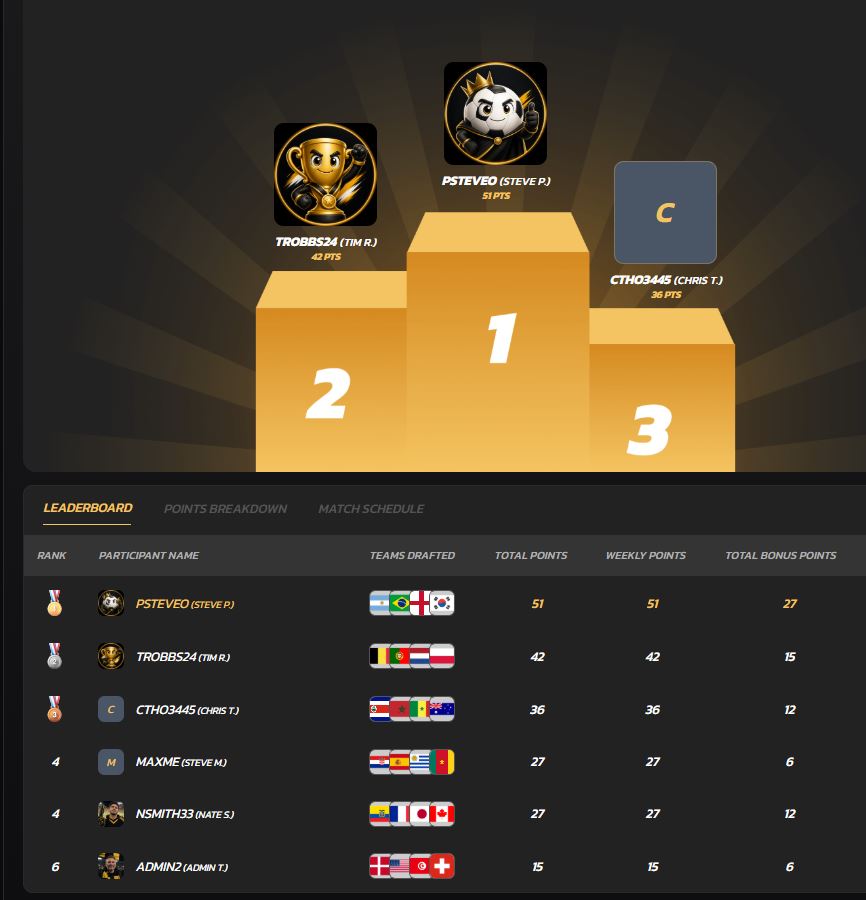
DraftWins lets you create a private college football pool, draft teams instead of players, and let automated scoring and live leaderboards handle the rest of the season. You set the rules once using a Casual, Classic, or Competitive template, lock them in, and send a private invite link to your group. The platform charges a one-time hosting fee to the commissioner and never touches entry fees or prize money, so how you handle payouts is entirely up to your group.
Head to the DraftWins pools page to create your private pool now, before your group's schedules get any harder to line up.
Sources
- How to do a March Madness-style bracket pool for the College Football Playoff | SB Nation
- Score big: The ROI of workplace rec sports teams | Employee Benefit News
FAQ
What is a college football draft pool?
A college football draft pool is a private group contest where participants draft entire college football teams, not individual players, and earn points based on how those teams perform during the season.
Is a college football draft pool legal for office and friend groups?
Running a pool for fun or bragging rights is generally fine, but any cash buy-in should be checked against your state's gambling laws and your employer's policies since rules vary by location; this article is general information, not legal advice.
Does DraftWins collect entry fees or hold prize money?
No, DraftWins charges a one-time hosting fee to the commissioner and does not collect entry fees, hold a prize pool, or pay out winnings, so any buy-ins are handled directly between participants.
Should I use a snake draft or an auction draft for a private pool?
A snake draft is faster and easier for casual groups, while an auction-style draft gives every participant more control over which teams they land, which some competitive groups prefer.
How many people should join a college football draft pool?
A moderate group size tends to work best, giving enough teams in play for real competition without making the draft feel endless.